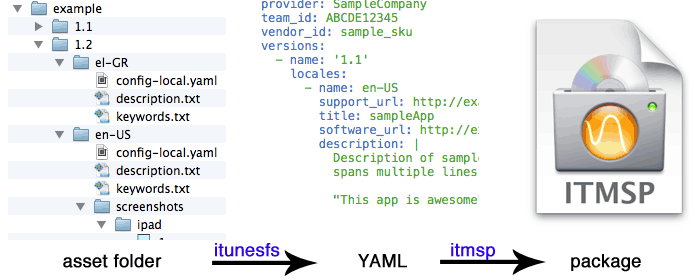
While getting ready for the latest version of Horizon that supports seven more languages, we had to update our App Store related assets: app description, screenshots, keywords, “What’s New” section etc. Using iTunes Connect interface slowed down the process considerably and did now allow for an easy way to manage and localize all those assets.
This is why we developed and used itunesfs, short for “iTunes File System”. It is a command line tool, written in Python 3, that lets us work directly on our assets and organize them in a simple file hierarchy. It takes care of generating the final .itmsp package that can be uploaded to iTunes Connect.
This approach makes the task of localizing the assets extremely easy, as every language is located inside a folder containing the corresponding files. The task can be automated even further by incorporating the Transifex command line tools.
If you are overwhelmed by maintaining a localized iOS app, you can download itunefs package from PyPi or install it using pip:
$ pip3 install itunesfs
After organising your files in the asset folder, itunesfs is as simple as running this:
$ itunesfs <path to folder>
This tool can be improved even further by adding support for in app purchases, leaderboards etc. If you feel like contributing, here is the project’s repo on Github.